Pay rates and time intervals
All 'Purchase to Pay' version 2.0 messages
All the 2.0 versions of the SETU 'Purchase to Pay' standards have a payRates container to specify a pay and/or bill rate. The content of this payRates container depends on the context of the message and the process step in which this message is exchanged. For example, in a Human Resource message the container specifies the pay and/or bill rate(s) the human resource is offered for, whereas in the Assignment and Timecard the container specifies the agreed pay and/or bill rate(s).
During the development of the 2.0 versions, the working group decided to simplify (the use of) the payRates container, as the previous 1.x versions contained a number of difficult constructs and dependencies. This page describes the payRates container in detail.
toBeBilled and toBePaid
Each payRates container includes a toBeBilled and toBePaid boolean element to indicate whether the pay rate applies for billing purposes (billed by the staffing supplier to the staffing customer via invoice) and/or for payment purposes (paid by the staffing supplier to the flex worker via pay slip). In practice, this means a pay rate specifies the billing rate, the payment rate, or the same rate applied to both.
If multiple, different pay rates need to be specified, for example when different rates are used for invoicing and payment, this is done by including the payRates container multiple times in the message.
Example of multiple, different payRates containers in a StaffingOrder message.
"payRates": [
  {
    "rateType": "TimeInterval",
    "code": "HT100",
    "amount": {
      "value": 15.45,
      "currency": {
        "value": "EUR"
      }
    },
    "intervalCode": {
      "value": "HourlyConsolidated"
    },
    "period": {
      "datePeriod": {
        "start": "2024-10-23"
      }
    },
    "toBeBilled": false,
    "toBePaid": true
  },
  {
    "rateType": "TimeInterval",
    "code": "HT100",
    "amount": {
      "value": 17.13,
      "currency": {
        "value": "EUR"
      }
    },
    "intervalCode": {
      "value": "HourlyConsolidated"
    },
    "period": {
      "datePeriod": {
        "start": "2024-10-23"
      }
    },
    "toBeBilled": true,
    "toBePaid": false
  }
]
Multiplier
All amounts in the messages must be specified and interpreted excluding multiplier. For example, when the amount/value of a payRates element is 20 euros, and the multiplier is 120 percent (specified as 120), then a calculation needs to be performed (outside of the message itself) to come up with the final rate of 24 euros.
This is different from the v1.x versions of the messages, where an InclusiveRate element explicitly specified whether the Amount provided in the Rates container already included the multiplier.
Timecard
A Timecard mainly consists of timeInterval and allowance elements. This specifies all hours worked, allowances and expenses for a specific flex worker over a certain period of work. A separate timeInterval element is filled in for each hour type per shift. A separate allowance element is completed for each type of allowance or expense, whereby the quantity can be used to determine how often the allowance or expense applies to the specific work period.
Example of specifying regular hours, overtime hours and travel expenses on a Timecard.
"timeInterval": [
  {
    "id": {
      "value": "5555-1",
      "schemeAgencyId": "Customer"
    },
    "typeCode": {
      "value": "HT100" // Regular hours
    },
    "period": {
      "dateTimePeriod": {
        "start": "2024-10-23T12:00:00",
        "end": "2024-10-23T17:00:00"
      }
    }
  },
  {
    "id": {
      "value": "5555-2",
      "schemeAgencyId": "Customer"
    },
    "typeCode": {
      "value": "HT200" // Overtime hours
    },
    "period": {
      "dateTimePeriod": {
        "start": "2024-10-23T17:00:00",
        "end": "2024-10-23T19:00:00"
      }
    }
  }
],
"allowance": [
  {
    "id": {
      "value": "5555-3",
      "schemeAgencyId": "Customer"
    },
    "typeCode": {
      "value": "EA102B" // Travel expenses
    },
    "period": {
      "datePeriod": {
        "start": "2024-10-23"
      }
    },
    "quantity": {
      "value": 1
    }
  }
]
Pay rates in Timecard
While the payRates container is defined at the root level in the Staffing Order, Human Resource and Assignment messages, the container has a different location in the Timecard message. In the Timecard, pay rates are specified within a timeInterval or allowance, with a maximum cardinality of 2, because a timeInterval can have different billing and paying rates. When those rates are the same, only one payRates container is needed, with both toBeBilled and toBePaid set to true. When the billing and paying rates differ, two payRates containers can be specified: one with toBeBilled set to true and toBePaid set to false for the billing rate, and vice versa for the paying rate.
Example of specifying the payRates of regular hours and overtime hours (with multiplier 120).
"timeInterval": [
  {
    "id": {
      "value": "5555-1",
      "schemeAgencyId": "Customer"
    },
    "typeCode": {
      "value": "HT100" // Regular hours
    },
    "period": {
      "dateTimePeriod": {
        "start": "2024-10-23T12:00:00",
        "end": "2024-10-23T17:00:00"
      }
    },
    "payRates": [
      {
        "amount": {
          "value": 15.45,
          "currency": {
            "value": "EUR"
          }
        },
        "intervalCode": {
          "value": "HourlyConsolidated"
        },
        "multiplier": 100,
        "toBeBilled": false,
        "toBePaid": true
      },
      {
        "amount": {
          "value": 17.13,
          "currency": {
            "value": "EUR"
          }
        },
        "intervalCode": {
          "value": "HourlyConsolidated"
        },
        "multiplier": 100,
        "toBeBilled": true,
        "toBePaid": false
      }
    ]
  },
  {
    "id": {
      "value": "5555-2",
      "schemeAgencyId": "Customer"
    },
    "typeCode": {
      "value": "HT200" // Overtime hours
    },
    "period": {
      "dateTimePeriod": {
        "start": "2024-10-23T17:00:00",
        "end": "2024-10-23T19:00:00"
      }
    },
    "payRates": [
      {
        "amount": {
          "value": 15.45,
          "currency": {
            "value": "EUR"
          }
        },
        "intervalCode": {
          "value": "HourlyConsolidated"
        },
        "multiplier": 120,
        "toBeBilled": false,
        "toBePaid": true
      },
      {
        "amount": {
          "value": 17.13,
          "currency": {
            "value": "EUR"
          }
        },
        "intervalCode": {
          "value": "HourlyConsolidated"
        },
        "multiplier": 120,
        "toBeBilled": true,
        "toBePaid": false
      }
    ]
  }
]
HourlyConsolidated and HourlySplit
Besides the amount, multiplier, toBeBilled and toBePaid elements, the payRates element also contains the intervalCode/value element. This element is used to express the interval period to which the amount applies. Typically, the pay rate amount is specified per hour. Then two different values are allowed:
HourlyConsolidated, the default. In this case theamountspecifies the hourly rate as the only rate for the time frame and may be a consolidation of multiple separate rates.HourlySplit. In this case theamountspecifies an hourly rate as one of multiple rates that apply. The total rate for the specific time frame is calculated as a sum of individual time intervals.
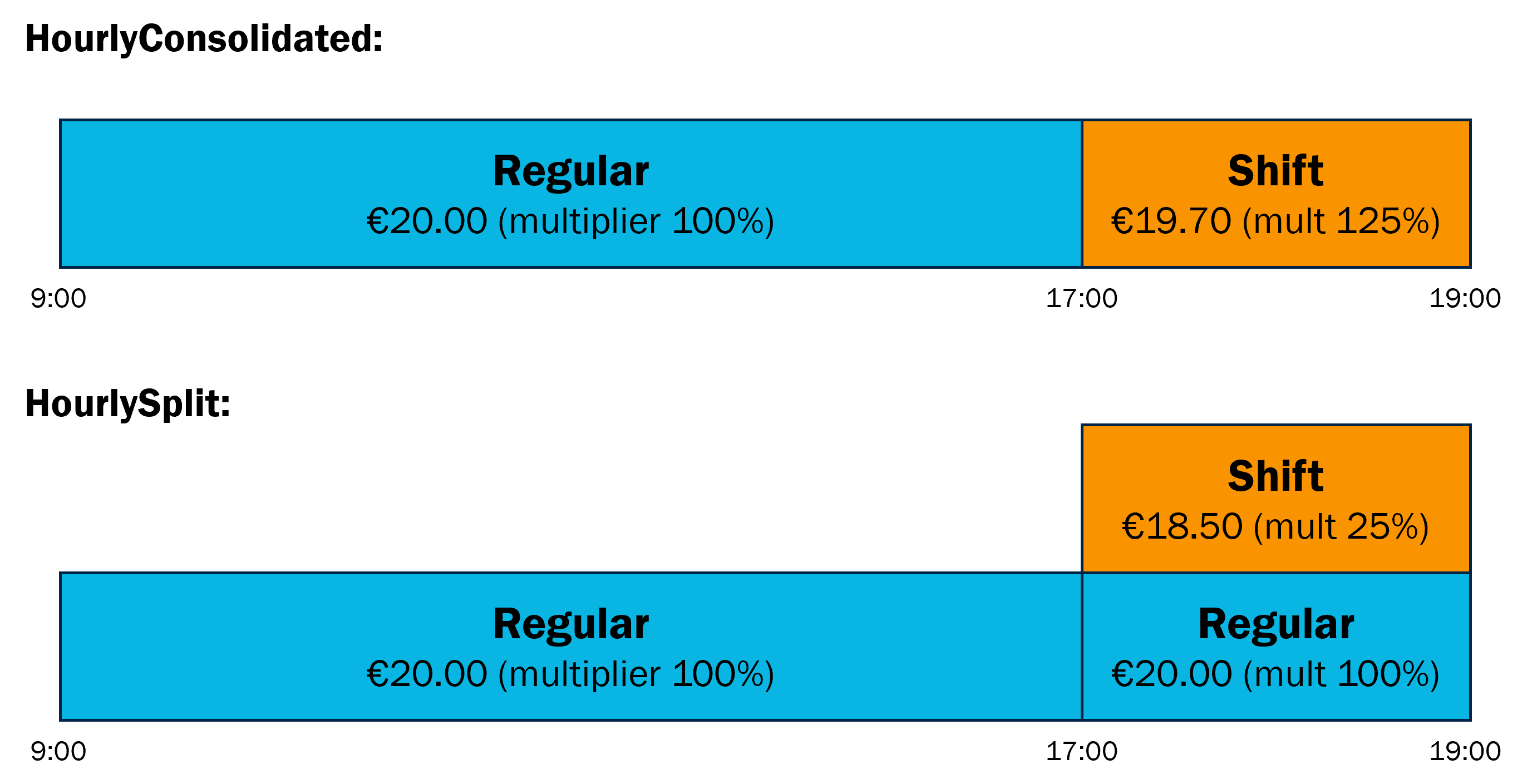
With a correct implementation of the Timecard version 2.0, you support both scenarios.
A person works 10 hours on a certain working day, of which 8 regular hours and 2 shift hours. The 2 shift hours have a 25% mark-up on top of the regular hour rate. When applying HourlySplit, two timeInterval elements are needed to specify the 2 shift hours on the Timecard: one line with 2 regular hours and a separate line with the shift surcharges.
"timeInterval": [
  {
    "id": {
      "value": "5555-1",
      "schemeAgencyId": "Customer"
    },
    "typeCode": {
      "value": "HT100" // Regular hours
    },
    "period": {
      "dateTimePeriod": {
        "start": "2024-10-23T09:00:00",
        "end": "2024-10-23T17:00:00"
      }
    },
    "payRates": [
      {
        "amount": {
          "value": 20.00,
          "currency": {
            "value": "EUR"
          }
        },
        "intervalCode": {
          "value": "HourlyConsolidated"
        },
        "multiplier": 100,
        "toBeBilled": true,
        "toBePaid": true
      }
    ]
  },
  {
    "id": {
      "value": "5555-2",
      "schemeAgencyId": "Customer"
    },
    "typeCode": {
      "value": "HT100" // Regular hours
    },
    "period": {
      "dateTimePeriod": {
        "start": "2024-10-23T17:00:00",
        "end": "2024-10-23T19:00:00"
      }
    },
    "payRates": [
      {
        "amount": {
          "value": 20.00,
          "currency": {
            "value": "EUR"
          }
        },
        "intervalCode": {
          "value": "HourlySplit"
        },
        "multiplier": 100,
        "toBeBilled": true,
        "toBePaid": true
      }
    ]
  },
  {
    "id": {
      "value": "5555-3",
      "schemeAgencyId": "Customer"
    },
    "typeCode": {
      "value": "HT300" // Shift hours
    },
    "period": {
      "dateTimePeriod": {
        "start": "2024-10-23T17:00:00",
        "end": "2024-10-23T19:00:00"
      }
    },
    "payRates": [
      {
        "amount": {
          "value": 18.50,
          "currency": {
            "value": "EUR"
          }
        },
        "intervalCode": {
          "value": "HourlySplit"
        },
        "multiplier": 25,
        "toBeBilled": true,
        "toBePaid": true
      }
    ]
  }
]
In case of applying HourlyConsolidated, the shift hours are consolidated into one line that contains both the regular hours and surcharges, by setting the multiplier to 125.
"timeInterval": [
  {
    "id": {
      "value": "5555-1",
      "schemeAgencyId": "Customer"
    },
    "typeCode": {
      "value": "HT100" // Regular hours
    },
    "period": {
      "dateTimePeriod": {
        "start": "2024-10-23T09:00:00",
        "end": "2024-10-23T17:00:00"
      }
    },
    "payRates": [
      {
        "amount": {
          "value": 20.00,
          "currency": {
            "value": "EUR"
          }
        },
        "intervalCode": {
          "value": "HourlyConsolidated"
        },
        "multiplier": 100,
        "toBeBilled": true,
        "toBePaid": true
      }
    ]
  },
  {
    "id": {
      "value": "5555-2",
      "schemeAgencyId": "Customer"
    },
    "typeCode": {
      "value": "HT300" // Shift hours
    },
    "period": {
      "dateTimePeriod": {
        "start": "2024-10-23T17:00:00",
        "end": "2024-10-23T19:00:00"
      }
    },
    "payRates": [
      {
        "amount": {
          "value": 19.70,
          "currency": {
            "value": "EUR"
          }
        },
        "intervalCode": {
          "value": "HourlyConsolidated"
        },
        "multiplier": 125,
        "toBeBilled": true,
        "toBePaid": true
      }
    ]
  }
]
Breaks
Due to the obligation in the WTTA (Wet toelating terbeschikkingstelling van arbeidskrachten) to register break times, it is possible to register breaks explicitly in the Timecard v2.0 (and if necessary also in the other 2.0 versions of the 'Purchase to Pay' messages). 'Break' has been added as an additional hour type (HT400) to the Hour Types 2.x codelist.
This means there are two ways to define breaks in combination with time intervals:
- Using a separate
timeIntervalcontainer to specify a break. - Using
timeTotal(the actual hours worked in the time interval) to derive a break. This option was also supported in v1.x of the Timecard (only the element to specify the time total was calledDurationthere). The break (length) can be derived by combining the values of thestartandendof the time intervalperiodtogether with thetimeTotal.
Example of break option 1, using a separate timeInterval container to specify a break, for a regular working day with a break at 12.
"timeInterval": [
  {
    "id": {
      "value": "5555-1",
      "schemeAgencyId": "Customer"
    },
    "typeCode": {
      "value": "HT100" // Regular hours
    },
    "period": {
      "dateTimePeriod": {
        "start": "2024-10-23T09:00:00",
        "end": "2024-10-23T12:00:00"
      }
    }
    // Specified pay rates
  },
  {
    "id": {
      "value": "5555-2",
      "schemeAgencyId": "Customer"
    },
    "typeCode": {
      "value": "HT400" // Break
    },
    "period": {
      "dateTimePeriod": {
        "start": "2024-10-23T12:00:00",
        "end": "2024-10-23T12:30:00"
      }
    }
    // Specified pay rates
  },
  {
    "id": {
      "value": "5555-3",
      "schemeAgencyId": "Customer"
    },
    "typeCode": {
      "value": "HT100" // Regular hours
    },
    "period": {
      "dateTimePeriod": {
        "start": "2024-10-23T12:30:00",
        "end": "2024-10-23T17:30:00"
      }
    }
    // Specified pay rates
  }
]
Example of break option 2, using timeTotal to derive a break, for a regular working day with a break of half an hour.
"timeInterval": [
  {
    "id": {
      "value": "5555-1",
      "schemeAgencyId": "Customer"
    },
    "typeCode": {
      "value": "HT100" // Regular hours
    },
    "period": {
      "dateTimePeriod": {
        "start": "2024-10-23T09:00:00",
        "end": "2024-10-23T17:30:00"
      }
    },
    "timeTotal": 8.00
    // Specified pay rates
  }
]
Improved Hour types and Allowance/expense codelists
The codelists used to fill in the typeCode value of a timeInterval (hour types) or allowance (allowance/expense types) element have been renewed. A second version of both the Hour types codelist and the Expense/Allowance types codelist has been introduced for use with the 'Purchase to Pay' version 2 messages.
Updating the codelists was necessary to:
- Remove unnecessary, unused codes;
- Make the codes themselves more usable by using a strict format of prefix and digits; and
- Add the hour code to specify breaks.
If a code is missing on one of the two codelists, please let us know via helpdesk@setu.nl.